Showing posts with label pc. Show all posts

31 January, 2011

F.lux - Automatic VDU brightness tool


Wow, it's all about links today, but I just have to share this one! ;) Check out this neat bit of (totally free) software - F.lux - it's basically a little toolbar app that automatically, and gently (if you check the "Slow 60m" check box during configuration) adjusts the brightness of your VDU depending on the time of day - it's location aware, so it knows when the sun is about to rise/set and will tweak the temperature accordingly, there is also a handy button to quickly disable it for an hour if you want to be doing something temperature critical (like photoshopping some pictures), it's supposed to be of great benefit when it comes to doing things like trying to go to sleep after extended periods staring at a monitor with the brightness turned all the way up (and let's be honest, when was the last time you actually manually adjusted the brightness on your VDU to account for environmental factors? It's only ever for battery life)...gotta be good for the environment too... ;)

05 February, 2010

VDU Mirror

Chimp
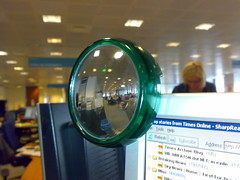
Had a minor desk move about two weeks ago, big plus point? I now have a practically uninterrupted view of the London skyline directly ahead of me (instead of having to glance to the side)...the minus point? My back now faces the route most people walk if they want to come and see me, so people can sneak up on me...luckily, in my understairs cupboard I had a solution I could dust off and stick to my VDU...

Welcome back to my trusty C.H.I.M.P. (or handy-dandy office workstation rear view mirror)... ;)

13 March, 2007

Blue Screen of Death (BSOD) Screen saver prank

Oh this is pretty funny...it makes it look like your PC has suffered the blue screen of death, even (if you choose the appropriate option) thrashing the hard disk light to make it look like it's in the middle of doing a kernel dump, then it pretends to restart the machine (and loops)...careful where you use it though, it's so convincing there have been reports of dopey IT staff re-imaging machines!

Download it here - Blue Screen of Death prank screensaver.

Coolest thing? It was written by Microsoft! <:0

10 January, 2007

Securely Wipe deleted files on XP for free

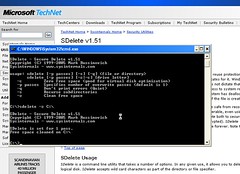
Sdelete
So Whittleman asked me the other day for a tool to wipe clean (properly wipe clean, not just into the recycle bin and empty, which leaves everything still there) all the files on his old PC as he is going to make a present of it to his mum...wonder what the dirty little scamp has been getting up to that he doesn't want mum to see eh..? ;)

So, as I was documenting it for him anyway, I thought I would copy and paste it for the greater good while I was at it...

This *free* tool, available direct from Microsoft technet, complies fully with the US Department of Defence clearing and sanitizing standard "DOD 5220.22-M", being in the knowledge of which, I'm sure, will make you feel very happy and secure... ;) Also note that the DOD usually feel the need to "clear and sanitize" four times (I'm sure you will be equally happy to hear), so you might want to repeat the last couple of steps a few times just to be on the safe side (depending on how "sensitive" your soon-to-be-deleted-data is, of course)...

So, to the procedure -

(Note - if the feds are banging on the door right now, it might be a little late to be starting this, as it takes about 15 minutes per sweep...so before you kick it off, move the freezer in front of the door... ;)


  1. Grab this file
  2. Extract the .exe file from the .zip file to the root of C:\
  3. Hit the "Start" button
  4. Hit "Run"
  5. Type in "CMD" (and press enter)
  6. Type in "cd\" (and press enter)
  7. Type in "sdelete /?" (enter)
  8. Click the “Agree” button
  9. Go back to the command window and type in "sdelete -z C:\" (enter)
  10. Wait until it finishes…Your free space on the drive is now as clean as the US Department of Defence insists it must be for a dumped hard drive…(well, actually, as I mentioned before they run it several times to be sure, you can choose the number of passes with -p [number], in the step above, or just do "sdelete -z C:\" (enter) again a few times, makes no difference)…

And there we go, all your accidentally downloaded animal pr0n will be gone forever!

06 November, 2006

Quake 3 Forever - Q3 in a browser!??

Incredbile but true, it's only 1.5Mb (you need to install the latest Shockwave player) but it runs perfectly! Try out Quake 3 in a browser! I found it worked best in Firefox... ;)

19 July, 2006

Easy, free anonymous web surfing / Easy way to bypass web censorship

Well, 3 ways actually...

1 - Use this bit of google - http://www.google.com/xhtml - it's a little bit clunky but gets around most proxy censorship and is reasonably anonymous

2 - Go and grab this thing (a hybrid of the Tor network and Firefox) and stick it on a pen drive (it runs fine direct from there) then whatever machine you are on you have totally anonymous, censorship free access to all the wonders of the world wide interweb (despite what the Chinese/Indian governments want to happen)...note - it takes a little while to establish the connection, be patient... ;)

3 - Use a simple Google translation hack (trick it into translating English into English) - Use this URL - http://www.google.com/translate?langpair=enen&u=www.bannedsite.com - (instead of www.bannedsite.com just stick the site you want on the end), it's less clunky browsing, but not anonymous...

Enjoy... ;)

18 July, 2006

FlickrInspector

This is really cool, check it out, you can enter any flickr user name/userid/email address and get a load of stats about them (for example over the last 483 days I have uploaded on average 3.37 pictures per day), and also interestingly see where their photos have been used elsewhere! Great for vanity searching... ;)

11 July, 2006

Second Life - An introduction by Cory Ondrejka

Okay, here is a paste from the comment I made on the previous post (but this is an important issue to discuss) and please note - *THIS IS BASED ON A 3 HOUR FIRST IMPRESSION OF THE PRODUCT POST THE CORPORATE PRESENTATION* -

As he constantly reminded us, Second Life is not a game, it's a tool set to build a virtual world, populated by "residents" who can all build whatever they like...(and can even keep it if they pay for land to store it on)...

It's attracting quite some interest by the popular press, see recent articles here and here...wikipedia entry here...not least the BBC who have been holding events and giving away free gifts to "residents", it is even rumoured that Hilary Clinton is going to set up an office in the game in order to canvas in the upcoming elections!

Great promise...a really great speaker...a really great experience? I installed it last night to see...

One thing that came across really strongly during the talk is the massive benefit for those people with Aspingers or that were Schizophrenic, and (implied, admittedly) those disabled people who really couldn't leave the house for physical reasons...this game literally gives them wings (your Avatar can fly from the very start)...

Also, from an architechures of participation point of view, this environment encourages creativity unlike anything else in Web 2.0 (some stupid figure like 70% of participants actually create things! This is incedible - did you know that of all the active users of eBay only FOUR PERCENT actually sell anything? Consider also out of all the huge number of users of the internet what a tiny fraction actually keep a blog up to date? It's effectively ZERO PERCENT, same with Wikipedia effectively zero percent of users actually bother to update it)..!

Anyway, hype aside, my brief look around tonight lead me to a 10 point observation -

1-There is a lot of empty space
2-The first area I teleported to I was walking around for about 4 minutes before (and there was no-one else there) I got a message asking me to leave
3-It feels like walking through a vast flea market, people have to pay to make unique things, and they want money to share (i.e. it's extremely commercial and obviously money driven to the core)
4 - My graphics card isn't quite up to the job...bah... :(
5 - A lot of the object code is dodgy (training areas aside) - the number of sofas that threw me into the air when I tried to stand up was a little silly, and also notable was the wonderful airship I found that threw me into the sea after not taking off, not moving and then complaining it hit something (which wasn't there)...
6 - A lot of the non-dodgy code is clunky (su doku in the help zone is extremely unfriendly)
7 - Educational or public service presentations work WELL (and are free, but I'm not sure they should be charging schools...)
8 - This environment is wonderful for crossing the boundary between IVL and IRL (especially the wonderful crossover between life and avatar at conferences/book signings/etc)...anything you can stream on the web (video, music etc.) you can stream into Second Life
9 - A few extra textures at launch would be nice...I wasn't very happy to arrive in the world looking like a classic US uni jock by default either, especially after being offered the choice at sign up (and choosing an interesting CyberGoth look - which was totally ignored), also the more interesting textures just look terrible on clothing, I thought chainmail jeans would be cool...but no...it looked more like blurry grey wool...
10 - I enjoyed being able to fly by default... ;)

I'm not out the door, and I admint I should try it out on a better machine...(the spec that Cory told me in person was a lot more acurate than the spec on the website)...

I also think newbies need a bit more of a guide to, say -

  • Welcoming groups
  • Cool things to see
  • Cool things to do

It wouldn't hurt to have an obvious - Teleport yourself here (to action/cool/popular thing, rather than just a location on the blurry map) object to engage people from the help island...

Also, in the style of MUDs or MMORPGs? Why not guild recruitment from the off? Instant feeling that you *belong*...

Anyway, there really isn't much excuse not to at least try it and tell me how wrong I am...it's only about a 20Mb download and it's free...(in the begining at least)... ;)

Cory Ondrejka - Speaking today

Well well well, Cory Ondrejka (CTO of Linden Lab) is coming to our office today to give a talk about Second Life! Cool...!

It's attracting quite some interest by the popular press, see recent articles here and here...wikipedia entry here...

Should be rather interesting! ;)

Update - Very cool presentation! Flyingpops is out tonight watching Jools Holland with work at Kew Gardens, so, assuming my creaking graphics card is up to it, I'll spend the evening wandering around "Second Life"...oo-er! ;)
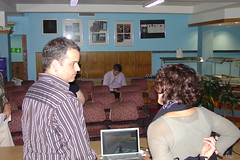
Cory Ondrejka...
(That's him on the left)

03 May, 2006

Nyko AirFlo mouse

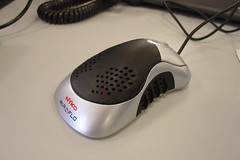
Nyko AirFlo mouse
My new mouse for the office - on the face of things it's a pretty standard optical mouse (3 button and wheel) but built into the interior is a little case fan that blows cool air onto your palm! They are quite reasonable too! Not sure I would use one at home as it isn't exactly whisper quiet but in the office (with it's general ambient babble) you can't detect it at all... ;)

So I'm going to have a nice cool mouse-hand this summer... :)

21 February, 2006

.aa to .mp3 conversion

Okay, I've gone through this so you don't have to...Ricky Gervais, in his wisdom, has decided to release his podcasts in .aa format which my Sony PSP won't play, so in order to turn them back into regular .mp3 files you need to go through the following procedure -

Convert .aa to .mp3

1) Install the nonsense that is mandatory to play .aa files (you'll go through that bit when you register at Audible.com)
2) Go here and grab the free version of "Total Audio Converter", install it, choosing all the default options
3) Grab this file
4) Grab this file (put it in the same place as the .dll you grabbed in step 3) and then run it, hit "install" and then "close" (when it's done), then you can delete both the .dll and the .exe
5) Re-boot
6) Launch "Total Audio Converter", navigate to the .aa file in the central dialogue, hit "MP3" in the "Convert to" bar at the top, then hit the "finish" button, then hit the "continue" button - you *may* see another dialogue box appear asking you for a logon and password, if so insert the logon and password you specified when you registered for Audible.com
7) Wait a few seconds then enjoy your shiny new .mp3 on your non-.aa playing audio device of choice... ;)

Update - looks like they may have done something to cripple the larger file size transfer process, if you get a hang at about 50% just download one of the other quality offerings and try again...happened a couple of times now...

Update Update - Looks like you can also use Goldwave 5.12 to do the conversion easily enough, as my Total Audio Converter trial period just ended and we have at least one Ricky Gervais podcast on the way...it's very easy, just do "File", "Open" then choose a filetype of "All" from the dropdown menu, once it has imported, just do "File", "Save As", then choose MP3 and off you go...peasy... ;)

Update update update - Audible really are being selfish, cutting all links to files, so I suggest just going with the Goldwave solution for the time being (a$$h0l3z)...

09 January, 2006

Polytetrafluoroethylene feet

...wow, the Logitech G5 Laser Mouse looks pretty sweet..! Can't imagine ever wanting my mouse to be any heavier though? Surely the lighter the better for gaming? Anyway, most impressively it's got a feature whereby you can modify the sensitivity on the fly, so you can flick immediately from wide sweeps for enemy movement, with the press of a button, to super sensitive mode to line up the headshot...sounds awesome!